

 MVTV ACADEMY PACKAGE – MODULES 1, 2 & 3
 Aspatore Books – Inside the Minds Leading Wall Street Investors
 STOCK OPTIONS BASICS COURSE - Follow Me Trades
 MTPredictor 7.5 (2.18.12) x32-x64
 ICHIMOKU CLOUD TRADING COURSE - FOLLOWMETRADES
 Professional Forex Trading Masterclass (PFTM) - Anton Kreil
 7 Things You MUST Know about Forex Candlesticks
 Craig Bttlc – The Adventures of the Cycle Hunter
 ACADEMY - TRADING COURSES BUNDLE
 FOLLOWMETRADES – MASTER TRADER COURSE
 Business Process Mapping - Improving Customer Satisfaction
 My Forex League – The Course
 Carlos M.Pelaez – The Global Recession Risk
 WEEKLY WIRES CLASS - SIMPLER TRADING
 10 Day Training Program - SMB Training
 Beau Crabill – Credit Cards for Business
 Jason Wardrop – Buyer Leads Mastery
 ACTIVEDAYTRADER – BOND TRADING BOOTCAMP
Description
SQUEEZE RADAR FOR TRADESTATION
Sale Page: simplertrading
Files of Product :
This product will available in 2-3 weeks later after you pay.
If you swing trade, position trade, or day trade watching multiple symbols, this indicator may be just what you need. Instead of watching multiple monitors, now you can simply import all the symbols you trade into the Radar Screen, and let the Squeeze go to work for you. For swing and position traders, import as many symbols as you want, the Squeeze Radar Scanner will scan the market and come up with possible buy/sell candidates. You can sort the list and place the most recent signals on top of the screen. Works on tick and all time-based time frames.
Squeeze Radar for Tradestation
We are here to help! Type in your question below to find what you need.
Monitor and Identity trade multiple charts for squeeze setups with the ST Squeeze Radar for Tradestation!
Reading the Squeeze Radar
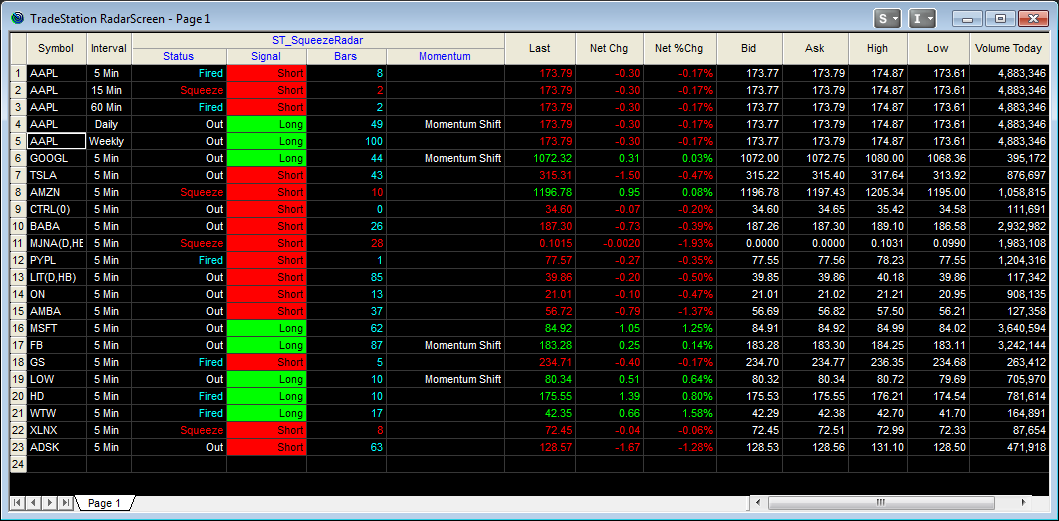
Once you have installed the Squeeze Radar to your Radar Screen in Tradestation and populated it with symbols you are trading, it’s time to understand what the columns are telling you.
Each of the columns is related to the Squeeze indicator. The ST SqueezeRadar allows you to quickly scan your watchlist for setups based on your trading plan.

Lets look at each of the columns listed in the ST SqueezeRadar section of your RadarScreen.
Status – This column is letting you know the status of the Squeeze on the symbol listed for the time interval listed. This could be Squeeze meaning it is in a squeeze, Fired meaning fired X bars ago or Out meaning out of a fired squeeze X bars ago. Check out the diagram below for a more clear display.
Signal – The signal column tells you which direction a squeeze has fired. This is based on the most recent squeeze.
Bars – The bars column tells you how many bars since a last squeeze has fired or how long a symbol has been in a squeeze.
Momentum – Momentum shift means there has been a swing or shift in momentum and price may be turning, if nothing is listed this means a continuation in the same direction.
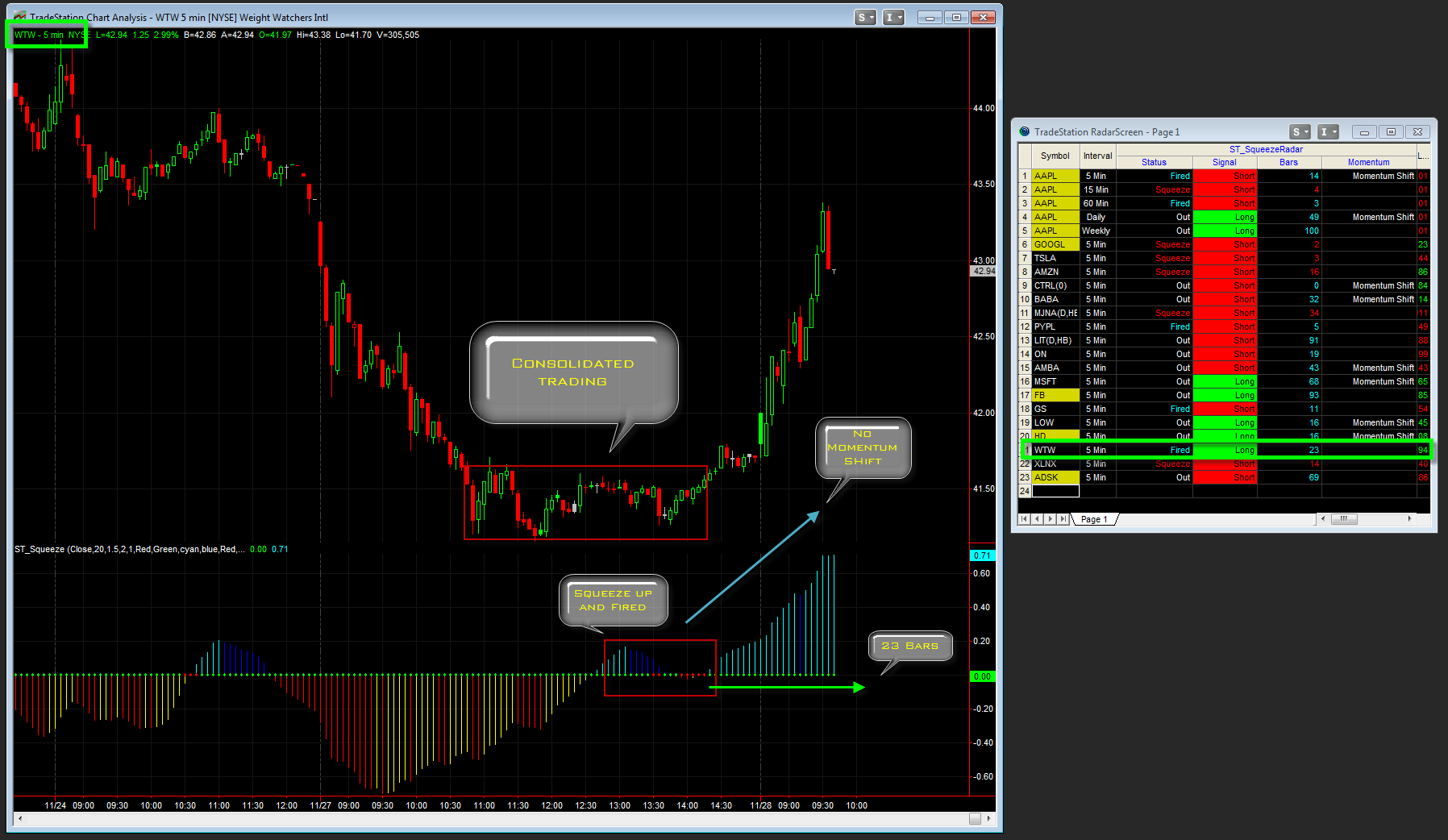
Example: WTW – Weight Watchers International

Notice for WTW, it has a Squeeze on the 5 Minute chart which has fired 21 bars ago. It also lets you know its is a continuation of bullish momentum.. See the corresponding chart below for a better look at this compared to the actual Squeeze displayed with the chart.
Putting it all together to trade:
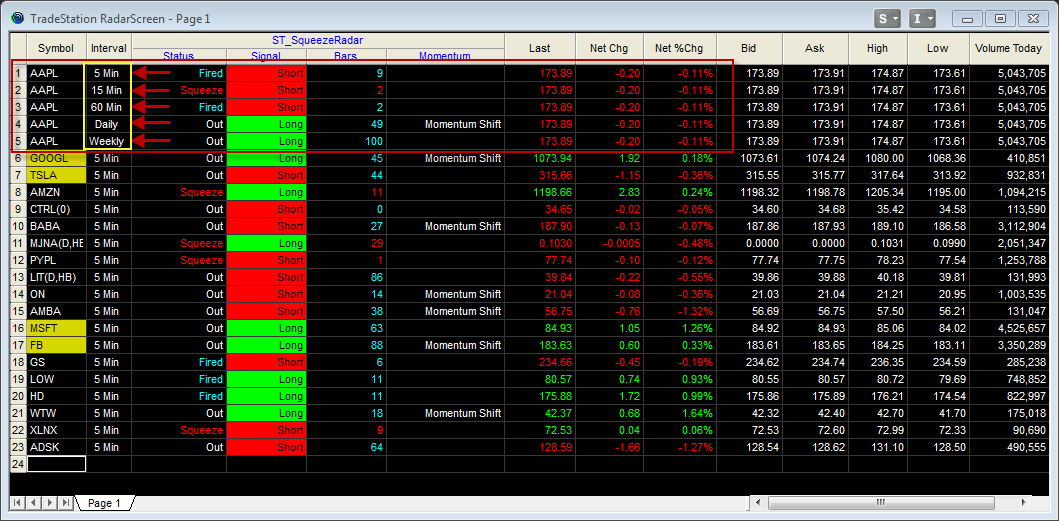
Within your watch list columns, it is best to group symbols together and add various time frames to find those high probability moments in time where there is a ” Nested Squeeze“.
The Nested Squeeze means there is a Squeeze setting up on Weekly, Daily and Intraday, or simply put Multiple time frames at the same time. This is one of the staple set ups which often leads to a greater than expected move.
Notice for AAPL, listed here is a 5 min, 15 min, 60 min, Daily and a Weekly view of the Squeeze. This gives a quick look at when AAPL is lining up nicely for a big move which you can then take advantage of for a trade. This beats having all 5 charts up at once and you can still watch other symbols as well.
SQUEEZE RADAR FOR TRADESTATION, Download SQUEEZE RADAR FOR TRADESTATION, Free SQUEEZE RADAR FOR TRADESTATION, SQUEEZE RADAR FOR TRADESTATION Torrent, SQUEEZE RADAR FOR TRADESTATION Review, SQUEEZE RADAR FOR TRADESTATION Groupbuy.
Reviews
There are no reviews yet.